Before the game
Before every game, Bill Walsh welcomes you to the home team's stadium. In a season game, he says the rank of any ranked team: "Today it's UL Monroe against #5 Georgia" Elevated.
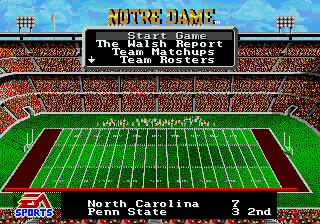
Pick an item with up and down and press C. The list scrolls: the arrow at the bottom means there is more. START brings you back to the menu from any item.
- Start Game: go to the coin toss.
- The Walsh Report: Walsh's scouting report on each team's offense and defense. In the 2026 Season Edition every team has its own report, written for 2026, naming the key players by jersey number Elevated.
- Team Matchups: the two teams rated side by side, one position group at a time. The higher number is the stronger group. You can only see this screen here, before the game.
- Team Rosters: both rosters, with ratings and energy. Left and right switch teams, up and down scroll the positions. C switches to names Elevated (chapter 11).
- Scoreboard: the scores of the day's other games; up and down scroll the list. The pause menu has it too.
- Set Audibles: choose the three plays your A, B and C audibles call, on offense and on defense (below).
- Play Call, Pass Catch, Pass Window: the same settings as on the pause menu (chapters 6 and 9). C switches between the two choices.
A ticker below the stadium shows the scores of other games. In a season it also shows the teams' ranks.
Setting your audibles
Each team has three audibles on offense and three on defense, one for each of A, B and C. Your choices stay set until you change them, from game to game. The game starts with these:
| Button | Offense | Defense |
|---|---|---|
| A | Wishbone, FL Streak | 4-4, Wide Zone |
| B | Veer, TE Curl | 4-4, Medium Zone |
| C | Shotgun, Deep Outs | 4-4, Short Zone |
To change them:
- Pick Set Audibles. Up and down pick the audible to change, for example offense B. Press C.
- Pick a formation and then a play, the same way as on the play-call screen (chapter 6). The audible list comes back.
- Pick Exit, or press START, to go back to the pregame menu.
In 1 Box mode you can make fake picks here too, so the player next to you can't tell which plays you set. During a game, Set Audibles is on the pause menu when you pause from the play-call screen.