Game Setup
Game Setup comes up after the title screen. Move between rows with the D-pad up and down, change a setting with left and right, and press START to go on.
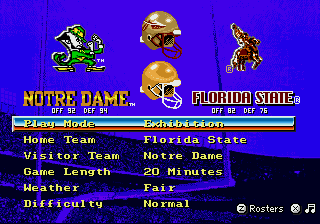
- Each team's OFF and DEF ratings, under its logo (Exhibition) Elevated
- The rows: Play Mode, the two teams, Game Length, Weather, Difficulty
- Hints: Z for Team Rosters, X for the menu music Elevated
The rows
- Play Mode: Exhibition (one game), New Season (start a season, chapter 10) or Continue Season (go back to the saved one).
- Home Team and Visitor Team: the teams are in alphabetical order. Hold left or right to scroll fast through the list Elevated.
- Game Length: 20, 40 or 60 minutes (5, 10 or 15 minutes a quarter). In a season, a longer game length also gives teams more scoring chances in simulated games.
- Weather: Fair, Windy, Rain or Snow. Wind moves kicks in the air, so aim to make up for it. In a season, the weather is chosen from the home team's climate.
- Difficulty Elevated: the original game has no difficulty setting; Elevated adds this row with four levels.
| Level | What the CPU does |
|---|---|
| Normal | Plays as in the original game |
| Smart | Calls audibles against your formation, and calls more plays to stop what has worked for you |
| Elite | Everything in Smart, plus +1 to the CPU team's ratings |
| Champion | Adjusts more and calls more audibles than Smart, +2 to the CPU team's ratings (+1 to speed), defenders who react faster, and a CPU team that gets tired at half the normal rate |
In a New Season two more rows show up: Schedule and Postseason (chapter 10).
OFF and DEF ratings
Under each logo, OFF and DEF are the team's offense and defense ratings, shown like modern overall ratings Elevated. In the 2026 Season Edition they come from the 2026 rosters. In the 1994 edition they come from each team's player ratings, for all 107 teams Elevated. The same numbers show on Team Schedules, and the season sim uses them to decide games.
Team Rosters from Game Setup
Press Z 6-button to see a team's roster without starting a game. It opens the highlighted team's roster, or the home team's. Left and right go to the previous or next team. C switches between ratings and names. Z or START goes back to Game Setup. More in chapter 11.
The controller screen
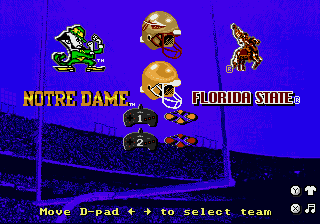
Press left or right to move your controller icon under the team you want to play. The CPU plays any team with no controller under it. To watch the CPU play itself, leave every controller in the middle. With two controllers, each player can take a team.
Uniforms Elevated 6-button: press Y under a team to pick its helmet, jersey and pants. Up and down choose the helmet, jersey or pants; left and right change it. Y closes the picker, and START starts the game. The visiting team always wears the opposite jersey color (dark or white) from the home team. If you don't pick a CPU team's uniform, it wears its regular home or away uniform.
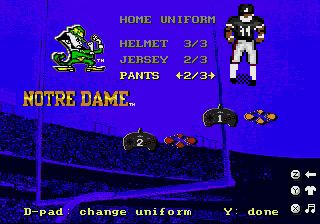
Most teams have their own alternates Elevated. In the 2026 edition, most teams have an extra helmet and pants, many have a second colored jersey, and teams that wear blackouts have them. In the 1994 edition, most teams have a second pair of pants; traditional teams such as Alabama and Penn State have none. In both editions LSU and Georgia Tech wear white at home. The Mod Toolkit's Teams tab edits the presets (Alternate uniforms).
Press START to go to the pregame show, or B or Z 6-button to go back to Game Setup Elevated (a Z hint shows above the uniform hint).